Skip to content
Kalever
  • How We Work
  • The Platform
  • Why Kalever
  • Resources
    • Articles
    • Product Decks
    • Case Studies
  • Contact
Kalever
  • How We Work
  • The Platform
  • Why Kalever
  • Resources
    • Articles
    • Product Decks
    • Case Studies
  • Contact

Getting Started

4
  • Your Home Dashboard: Overview
  • Account and Notification Settings
  • Create a New Project
  • Navigating the Project Dashboard

Pricing tool

2
  • How to Create a New Quote
  • How to Download, Edit, and Duplicate Quotes

Survey Creator

7
  • How to Create a New Survey
  • Classic Editor: Control Area
  • Classic Editor: Overview
  • Classic Editor: Adding and Editing Survey Elements
  • Classic Editor: Using Custom Modules
  • Decipher Editor: Editing Your Survey
  • AI Assistant

TrackEntry Tool

4
  • Introduction to TrackEntry: Access and Overview
  • How to Create, Edit, and Manage Entries
  • Using Live Chat for Real-Time Communication
  • How to Integrate TrackEntry with a Decipher Survey

Codebooks Tool

2
  • Creating a Codebook for Open-Ended Data
  • How to Edit and Manage Your Codebook

Best Practices: A Project Lifecycle Guide

8
  • The Bidding Stage: Creating a Winning Quote
  • Phase 1: The Bidding Stage: Creating a Winning Quote
  • Phase 2: Project Kick-Off: Setting Up for Success
  • Phase 3: Questionnaire Design — From Idea to Final Draft
  • Phase 4: Initial Survey Programming: A Seamless Handoff
  • Phase 5: QA – Efficient and Traceable Survey Testing
  • Phase 6: Managing Client Feedback and Changes
  • Phase 7: Data Checks — Ensuring Data Quality

ResearchReady

4
  • Introduction to ResearchReady
  • Accessing ResearchReady
  • Running an Analysis within ResearchReady tool
  • Reviewing Results
View Categories
  • Home
  • Knowledge Base
  • ResearchReady
  • Introduction to ResearchReady

Introduction to ResearchReady

ResearchReady is a tool that uses AI instruments for  analyzing your survey and providing instant insights across key quality, statistical, legal and research criteria. It helps you identify issues, assess respondent experience, validate structure, and most importantly it suggests targeted improvements which are reliably linked to the right question, option, paragraph or section and which a team can easily act on.

 You can use ResearchReady to:

  • Check survey logic and flow
  • Evaluate statistics (e.g., length, incidence rate, number of questions, sections, grids, Open-End questions) and complexity
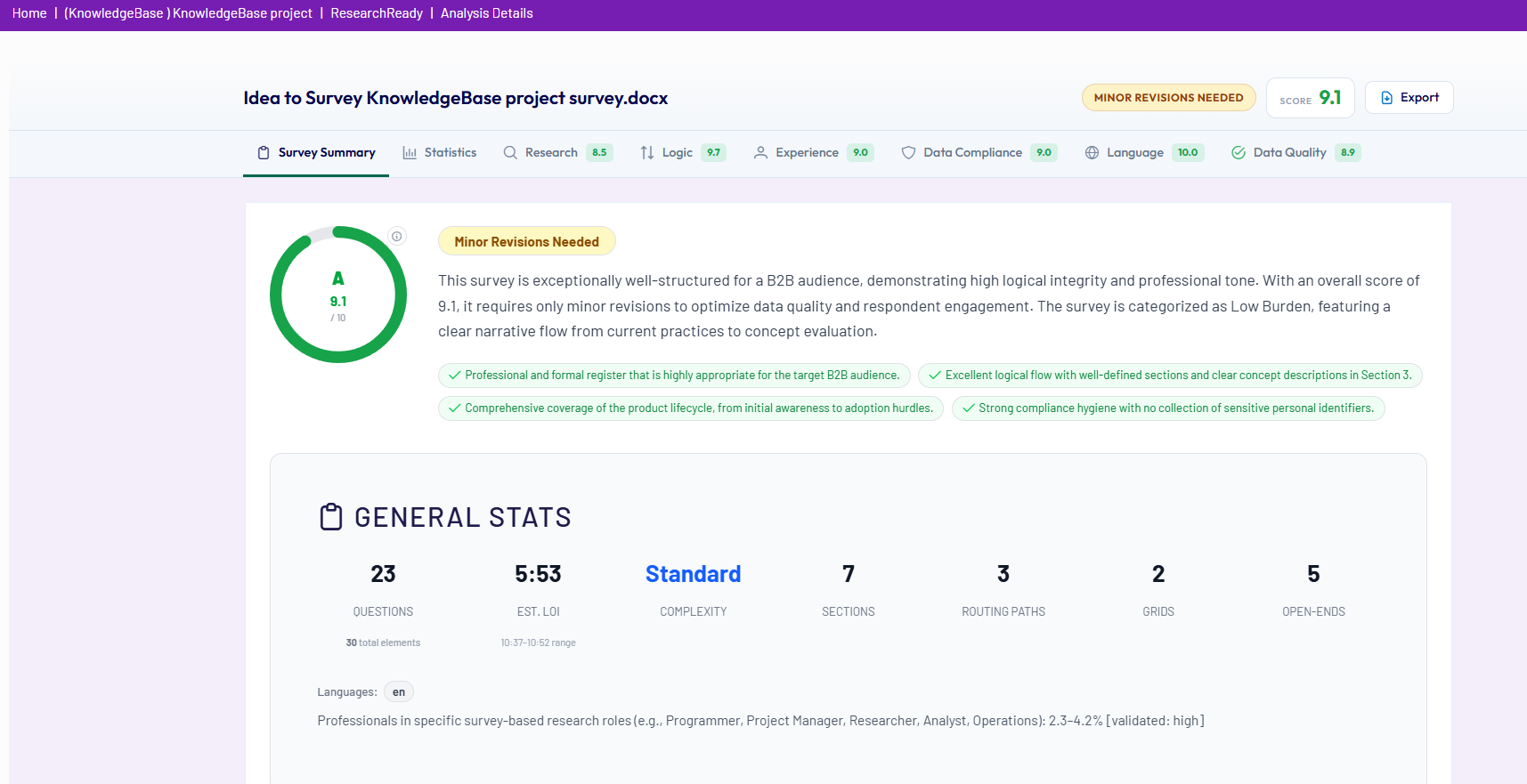
  • Ensure data compliance and data quality
  • Improve respondent experience
  • Review Spelling&Grammar
Reviewing ResultsAccessing ResearchReady

Share This Article :

  • Facebook
  • X
  • LinkedIn
  • Pinterest

Was it helpful ?

  • Happy
  • Normal
  • Sad
Contact form
Contact form
Linkedin

Copyright © 2026 Kalever | Powered by Kalever